
How to Create a Session Table with the session_traffic_source_last_click Field in BigQuery?

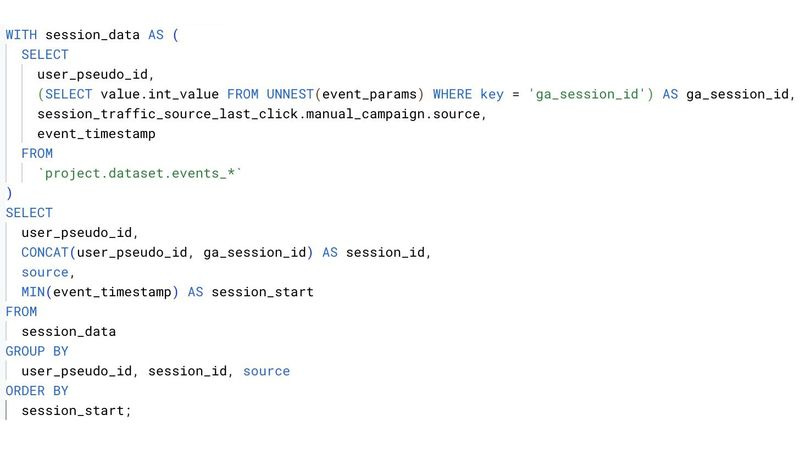
When it comes to traffic analysis, the last-click attribution model is one of the most popular approaches. It answers a simple question: where did the user come from before taking a desired action? Creating a session table with the new session_traffic_source_last_click field in BigQuery allows for a deeper understanding of user journeys and a better assessment of each source's contribution.
In the past, we always relied on collected_traffic_source, but this new field provides more precise data, reflecting the last-click logic in GA4.
Here’s how to do it:
1. Start with the GA4 events table, which includes user_pseudo_id, event_params, and traffic source data.
2. Extract unique session identifiers (ga_session_id) and combine them with user_pseudo_id to create a unique session_id.
3. The session_traffic_source_last_click field helps identify the source from which the user arrived, adhering to the last-click logic in GA4.
4. Construct the session table using window functions or grouping to establish the start time of each session and distribute events accordingly.
For a detailed guide, check out the screenshot with an example query in the attached image.